
How to grow on YouTube is a key question for new and emerging YouTubers. The answer? Engage your audience!
Metrics that measure engagement – from your click-through-rate (CTR) to shares, subs, and comments – are crucial ranking factors for YouTube’s algorithm. They help your videos show up in search results and recommendations.
Moreover, engagement metrics are essential when it comes to negotiating with sponsors. In the eyes of a brand looking for exposure, having fewer but highly engaged followers often beats having a massive but uninterested audience.
Finally, engaging your audience doesn’t just help you grow on YouTube. It’s also vital for monetizing your channel. Keeping viewers’ attention throughout your videos increases your income from ads through the YouTube Partner Program. And: Engaged followers are way more likely to purchase merchandise, donate to you on Patreon, or use the fan funding features (like Super Thanks).
That said, what can you do to actually boost audience engagement and grow on YouTube? What’s the secret sauce that’ll take your channel to the next level?
We’ve rounded up 10 tried-and-tested strategies professional creators use to improve their engagement. Here’s everything you need to know.
Quick Facts
- The key metrics are CTR, AVD, and the Like-Dislike Ratio.
- Watch out for audience retention drops.
- You need good videos, good thumbnails and lots of audience engagement.
- Outsource some tasks to professionals to save time and get great results.
Keep reading for the full scoop!
Contents

Evaluate Your Current Performance
To start with, if you’re asking yourself how to grow on YouTube, you need to take a look at your content’s current performance. It’s essential to understand which parts of your videos resonate best with your audience – and a better idea of who exactly your audience is. It might
The good news? YouTube Studio offers a wealth of information in its analytics tab. You can check out the performance of your channel overall, as well as how individual videos are doing.
Some key metrics for engagement include:
- Impressions click-through rate (CTR)
- Average view duration (AVD)
- Audience retention
- Like-to-dislike ratio
- Subscribes (and where they come from)

Don’t want to do that yourself? Or would like a fresh set of eyes on this? You can get YouTube channel audits from freelancers and YouTube channel management services.
The Key Performance Metrics
Your Impressions CTR tells you how many people click on your video when it pops up in their search results or recommendations. This can help you to pinpoint which thumbnails and video titles people find most intriguing – and to optimize videos that under-perform.
Next, average view duration tells you how long a viewer typically spends watching your content. The longer, the better. This is also where audience retention comes in. For each video, you can see the exact percentage of initial viewers that keep watching at each point in your content. You can also see which parts are particularly popular, where people come back to rewatch it.

Your like-to-dislike ratio is self-explanatory. While YouTube doesn’t show dislikes to viewers anymore (though some tools help you guess), creators can still see them. The ratios give you invaluable insights into which videos your viewers loved, and which ones disappointed them.
Finally, it’s also worth taking a closer look at your subscribers, and where they come from. How does your subscriber growth change over time? Was there a surge in subs after you published a particular video? If so, which one? And: Do they get bell notifications?
These are just some questions you should dive into using channel analytics before you get started on the other strategies below. Understanding what works in your content is key before you start improving it.

Leverage Shorts
Let’s now talk about a first concrete strategy for boosting your audience engagement – and growing on YouTube. And that’s doing YouTube Shorts.
Launched in 2020 in response to TikTok and Instagram Reels, Shorts lets you create short-form vertical videos. While originally separate from YouTube’s long-form content – leading creators like MrBeast and PewDiePie to launch separate Shorts channels – it is now fairly integrated.
Shorts feature on viewers’ dashboards, searches and in the dedicated tab on creators’ channels. They also factor into the algorithm’s evaluation of a channel’s performance.
In terms of users, Shorts is among the most popular vertical video formats, with some 2 billion active monthly users and 200 billion daily views since mid-2025. IG Reels are similarly popular, and both have TikTok beat by a dramatic margin.
Crucially, many viewers use Shorts to discover new content and creators. According to Google, creators who upload both Shorts and long-form content see longer overall watch time and sustained subscriber growth.
So how can you use Shorts to grow on YouTube?
For one, you can reformat existing content to create Shorts teasers. This is also a great strategy to revitalize existing videos that may be underperforming. With a little more effort, you can also cross-post them on TikTok, Instagram, and elsewhere for better promotion.

The Yoga YouTube channel BohoBeautiful uses Shorts teasers to help viewers discover their long-form content.
Another strategy is to create original Shorts, even if it is just to announce your upcoming long-form YouTube videos, or give a sneak peek of what you’re working on.
They’re also the perfect format to work with other people’s short vertical videos, whether that’s a TikTok clip or someone else’s Short.
Finally, you can now also use Shorts to engage with individual viewers directly, by replying to their comments. More on that below!

Use Custom-Tailored Thumbnails
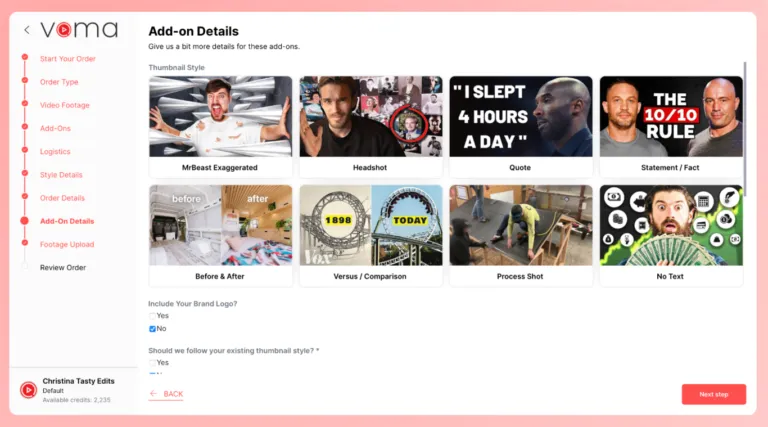
Another strategy to supercharge your YouTube growth is to carefully craft your video thumbnails. If you haven’t put much effort into them so far, here’s your push to reconsider.
While YouTube auto-generates a thumbnail when you upload a video, custom thumbnails have a much better chance of captivating viewers’ attention when they see them in search results and recommendations.
In fact, statistics show that simply adding a custom thumbnail can boost your CTR by as much as 34%.
Going further, customizing your thumbnail also strengthens your branding. Most professional creators have a distinct, consistent thumbnail style that helps viewers recognize them instantly.
Making a custom thumbnail can be challenging at first, but there are plenty of tricks and tools you can use, as well as free online design resources and, of course, AI tools. An alternative is to outsource thumbnail creation to a professional graphic designer, who’ll be able to guarantee a consistent style and high quality.
In a similar vein: Now that YouTube does video previews, it’s worth considering making an impactful custom intro. Or revamping your existing ones.

Upload Custom Captions
Next, another strategy for boosting YouTube engagement and growth is to upload custom captions. Again, YouTube auto-generates captions, but these can be flawed, especially if you make videos about niche topics, have an accent, or don’t use one of the major languages..
What’s more, automatic speech recognition (ASR) on YouTube isn’t available on all videos. ASR is limited to certain languages, specifically English, Dutch, French, German, Italian, Japanese, Korean, Portuguese, Russian, and Spanish (at the time of this writing).
The alternative? Generate your own captions, make sure they’re correct, and upload them manually. You can also translate them and make subtitles for your video available in multiple languages.
Not only does this help you engage an international audience. It also boosts your chances of retaining viewers who are watching your videos without sound – which is a considerable percentage of people on YouTube.
A survey by Verizon showed that 69% of people watch videos with sound off in public places, and 25% in private places. It also revealed that 80% of them are more likely to keep watching when captions are available. They’re also great for video accessibility, allowing people who are deaf or hard of hearing to join your community.
Similarly, consider dubbing your videos into other languages (especially the larger or more relevant ones for you). With multi-language audio, you no longer have to run separate channels or upload separate videos. There’s certainly quite a bit of effort involved, so you will want to weigh whether it’s worth it – but it could give you access to a huge pool of new viewers.
The bottom line? If you want to grow on YouTube, captions and dubs are a major asset.

Add Chapters Manually
Video chapters are another tool you can leverage to boost engagement and YouTube growth. In this case, it’s by setting viewers’ expectations from the get-go and allowing them to jump to the parts of your video that are most relevant to them.
You can create chapters in the description of your video simply by adding a timestamp and title for each section of your video. This lets viewers gauge the structure of your content straight away, and assess whether it’s relevant to them.
Say you’re creating coding tutorials in Python. Someone who’s moderately proficient already may want to skip ahead to the applications they’re not familiar with yet. Chapters allow them to do just that and prevent them from returning to the search to look for a different video.

Plus, you can also strategically place keywords in your capter titles that will help you rank in search results. Ideally, you’re already thinking about this when you do up your video script.

Harness Livestreams
As we’ve established, interacting with your audience and establishing a personal connection is a key element in tackling the challenge of how to grow on YouTube. And to achieve this, there are few strategies as effective as livestreams.
Going live is a fantastic way of nurturing the bond you have with your followers, and drawing in new fans. It also allows you to benefit from monetization and tipping features like Super Chat and Super Stickers.
During live streams, you can interact with individual viewers by responding on-camera to comments they leave in the chat. You can brainstorm ideas for content, get feedback – and add a very human and immediate dimension to your relationship with them.

Live streams are straightforward to set up. You can stream from both mobile and desktop, and even use an encoder if you want to stream gameplay content or use overlays.
And yes, you can simultaneously stream on YouTube and Twitch (and other streaming platforms) to instantly increase your potential audience. Simulcasting is generally allowed, if slightly tricky to set up. Do look at the platforms’ actual terms of service first, though.

Use End Screens and Cards
Two other YouTube features that can help you overcome the challenge of how to grow on YouTube are end screens and cards.
Getting someone to watch your content is half the battle. By adding custom-tailored end screens and cards, you can keep them watching and establish a connection to your other content.
Say you’re making a tutorial on how to knit a sweater and you’re talking about different patterns and needles you will use. Instead of going into detail on each of them, you can add cards with links to videos in which you explain in depth how to knit each pattern and which needles to use. Similarly, you can use the end screen to link your video to others on your channel, like a tutorial on how to make socks or a scarf.
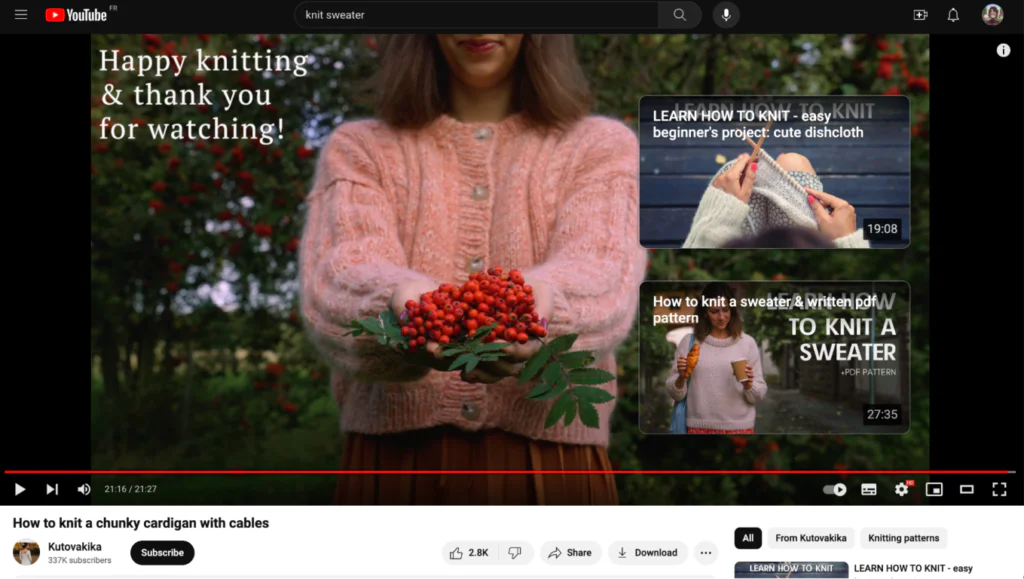
Plus, end screens and cards are also great places to add other calls to action, like subscribing to your Patreon or following you on other social media platforms.
And while it’s a bit cliche: Don’t just do the old “like and subscribe,” but also ask them to turn on notifications. They’ll actually know the instant you upload something, and can contribute some vital early engagement.

Leverage YouTube Community Posts & Ask for Feedback in Polls, Image Polls and Quizzes
One of newer functionalities on YouTube you can leverage to grow on YouTube are community posts, especially polls and quizzes.
There used to be a subscriber threshold you needed to clear before being able to use the Community tab on your channel. That’s a thing of the past. Any creator can now use community posts to interact with their audience.
(Note that the tab was renamed Posts from Community, which you still see on the screenshot below.)

The best thing about them? Community posts come in several formats, including:
- Text posts
- Image posts
- Polls
- Image polls
- Quizzes
- GIFs
All these give you access to a wide array of tools to connect with your followers and get their feedback.
Star creators like MrBeast use these features to gauge the preferences of their audience – asking whether they approve of video ideas or what they’d like to see him do next.
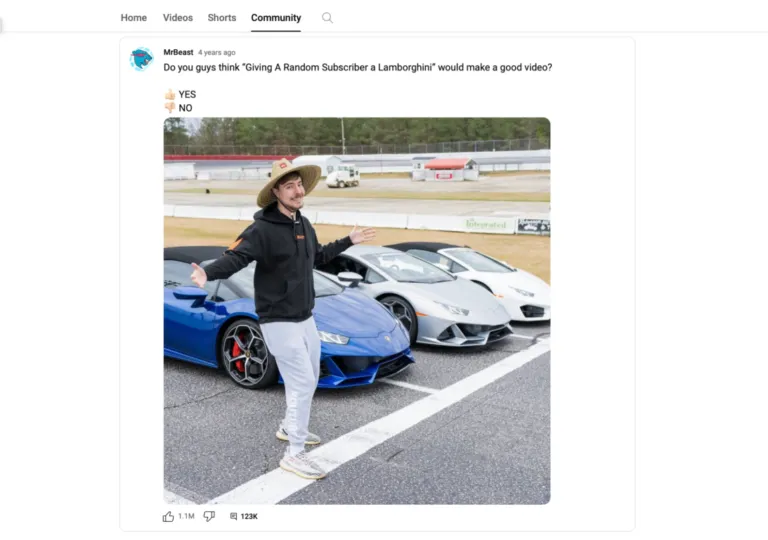
As with videos, you can also assess the performance of all of your community posts in YouTube Studio analytics.
Don’t fancy keeping up with posting every day? No need to worry – you can also batch and schedule posts in advance.

Reply to Comments with Text and Shorts
Community posting is one strategy to supercharge engagement and YouTube growth, replying to comments is another – both on your videos and on community posts.
If you’re not doing anything here, it’s probably the best place to start actually engaging with your audience. You’re committing little other than some of your time.
For someone who commented on your content, getting a reply from you can give them a major buzz. Other people in the comments section, seeing you engage with people, are more likely to leave comments as well. They feel heard, knowing that you read what they write.
Comments are also a great place to get feedback on new video ideas, and to encourage viewers to leave prompts and notes on what they want to see in your videos.
You can now also reply to comments with a YouTube Short. Find the comment you want to reply to, hit the reply button, and you’ll see a Shorts option on the right, next to the text field.
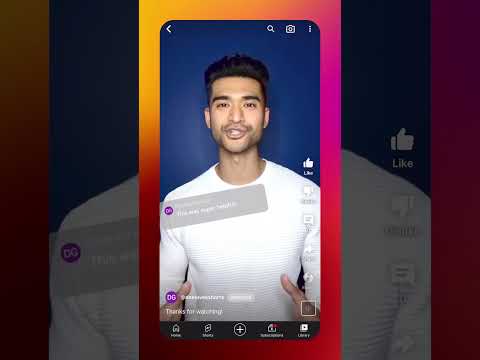
Here’s how it works.
Not only is this an easy way to create unique, original content. It’s also an amazing strategy to engage individual followers and respond to their feedback. It also signals authenticity – any channel manager can write whatever in the comments, following the best practices you establish. A video response demonstrates real effort (until AI clones become common enough, at least).

Systematically Revitalize Older Content
Finally, a core strategy to grow on YouTube is to circle back and systematically brush up your older content.
While it’s important to apply all the strategies outlined so far to content you create going forward, giving some TLC to your existing videos can pay off massively.
Check which ones are underperforming in YouTube Studio, then pinpoint why. Do they need new titles? Better thumbnails? Chapters? Custom captions? More extensive descriptions?


Messy thumbnails on your old videos could hurt your gains. Revamping them is an easy way to revitalize content that’s still relevant.
Messy thumbnails on your old videos could hurt your gains. Revamping them is an easy way to revitalize content that’s still relevant.
While YouTube doesn’t allow you to outright “update” old videos, it does have a function to trim and cut out parts of your clip. It’s used chiefly for removing content with copyright issues. But if you ever find yourself in a situation where deleting a few seconds would improve retention – you can!
Once you’ve figured out which improvements to make and implement them, you can start promoting your refurbished content – through cards and end screens, playlists and Shorts reformats.
Conclusion: This is How to Grow on YouTube!
There’s no secret trick to driving up your YouTube audience engagement overnight. It takes a systematic effort and a combination of several strategies to boost engagement in the long term.
That effort pays off, however.
Once you’ve analyzed your performance and integrated strategies like adding chapters, custom thumbnails, cards, and captions to your video creation workflow, they’ll come naturally to you. The same goes for making livestreams and Shorts part of your content strategy, and engaging regularly with followers through community posts and replies to video comments.
While it may take a while to gather traction, implementing these strategies is guaranteed to level up your engagement and help you on your road to YouTube success.


FAQs
First take a look at your analytics to identify strong and weak videos, and the point where viewers drop off. Then polish up your thumbnails and descriptions. Going forward, engage with your audience: Reply to comments and make community posts.
You need good content at a steady pace, and you need to maximize audience engagement. That means great thumbnails, great storytelling, and using every tool YouTube gives you, from analytics over cards to Shorts as teasers.
Yes. It’s like professional sports: The competition is heavy, it takes a lot of hard work, luck and a very long breath. You can, however, use pro strategies to work your way up.
You can make progress inside a month, but it will take a lot of effort. You’ll need to post high-quality video often and promote it heavily, and use every audience engagement strategy in the book.
Absolutely not. You may temporarily get a few bot subscribers, but they will be removed eventually. Worse, they will also wreck your engagement metrics. Worst, you can get your channel terminated.